Table of Contents
Transforming a dark game room into an immersive gaming sanctuary starts with the right lighting strategy. While many gamers focus on high-end monitors and ergonomic chairs, lighting remains the unsung hero that can dramatically elevate your entire experience. Poor lighting in dark spaces creates eye strain, washes out your screen’s colors, and leaves you squinting at crucial moments when split-second decisions matter most. The perfect gaming table lighting doesn’t just illuminate your space—it becomes an integral part of your gaming atmosphere, enhancing focus, reducing fatigue, and creating that coveted ambient glow that makes every session feel cinematic.
Finding the ideal lighting solution requires balancing functionality with aesthetics. You need illumination that’s bright enough to see your peripherals and read game manuals, yet subtle enough to prevent screen glare and maintain that immersive dark-room atmosphere. Today’s lighting technology offers unprecedented control over color, brightness, and synchronization, allowing you to craft an environment that adapts to whatever genre you’re playing. Whether you’re battling in competitive shooters, exploring vast RPG worlds, or streaming to an audience, understanding the nuances of gaming table lighting will revolutionize how you experience your favorite titles.
Top 10 Gaming Table Lights
Detailed Product Reviews
1. Govee Smart LED Light Bars, Work with Alexa and Google Assistant, RGBICWW WiFi TV Backlights with Scene and Music Modes for Gaming, Pictures, PC, Room Decoration

Overview:
The Govee Smart LED Light Bars represent the premium tier of ambient lighting solutions, designed specifically for gamers and content creators seeking dynamic illumination. These WiFi-enabled bars employ advanced RGBICWW technology to produce segmented rainbow effects across 16 million colors, transforming any monitor setup into a vibrant display. The 106-inch cord provides flexible placement options behind monitors, TVs, or as standalone accent lighting.
What Makes It Stand Out:
The integration of voice control through Alexa and Google Assistant sets this apart from basic LED strips. The internal high-sensitivity mic enables real-time music synchronization without requiring an external hub. The Govee Home App offers granular control over segmented colors, brightness, and lighting effects, plus access to user-generated content in the Light Studio community. This ecosystem approach creates endless customization possibilities.
Value for Money:
While pricier than basic USB-powered alternatives, these light bars justify the cost through smart home integration and advanced customization. Competing products often require separate hubs or offer limited app functionality. The versatile mounting options and 106-inch cord provide flexibility that cheaper units lack, making it a worthwhile investment for serious enthusiasts who want professional-grade lighting effects.
Strengths and Weaknesses:
Pros:
- Advanced RGBICWW technology with segmented color control
- Voice assistant compatibility (Alexa/Google)
- Robust app ecosystem with community effects
- Music sync capabilities with built-in mic
- Versatile mounting options and long cord
- No hub required
Cons:
- WiFi dependency may deter some users
- Recommended for monitors under 45 inches only
- Setup requires app installation
- Premium pricing
Bottom Line:
For tech-savvy users wanting seamless smart home integration and advanced lighting effects, the Govee Smart LED Light Bars deliver exceptional performance and customization that budget alternatives cannot match.
2. velted RGB Light Bar, Music Sync RGB IC LED Lights Bars, USB Powered Ambient Lighting, Remote Control Color Changing Gaming TV Backlight, 8 Dynamic Modes for PC Room Monitor Desk

Overview:
The velted RGB Light Bar offers a straightforward, no-frills approach to ambient lighting for gaming setups. This USB-powered solution delivers colorful illumination without the complexity of WiFi networks or app installations, making it ideal for users who prioritize plug-and-play simplicity over advanced features. Its compact design fits discreetly behind monitors or under desks.
What Makes It Stand Out:
Its dual-control system provides both remote and physical button operation, ensuring accessibility even when the remote is misplaced. The built-in IC technology enables eight dynamic color modes that respond to environmental sound through three distinct music sync settings. The detachable base and USB power source create remarkable versatility across PC monitors, consoles, and TVs without requiring dedicated power outlets.
Value for Money:
This budget-friendly option competes directly with entry-level light bars while offering superior control options. The absence of WiFi connectivity eliminates potential network conflicts and simplifies operation. For users seeking basic RGB effects without smart home premiums, this delivers essential functionality at a fraction of Govee’s price point, making it an economical choice for students and casual gamers.
Strengths and Weaknesses:
Pros:
- Simple plug-and-play setup
- Dual control methods (remote and button)
- USB powered versatility
- Stable operation without WiFi
- Affordable pricing
- Detachable base
Cons:
- No white light capability
- Limited color customization compared to app-controlled alternatives
- No voice control
- Fewer dynamic modes than premium options
Bottom Line:
Perfect for budget-conscious gamers wanting immediate, reliable RGB lighting without technical complexity. The velted Light Bar excels in simplicity and value, though it sacrifices advanced customization.
3. HLDIRECT 47 Inch Gaming Desk with LED Lights, Large RGB Computer Gaming Desk Table with Cup Holder Headphone Hook Mouse Pad, Ergonomic Modern Carbon Fiber Mesa Gamer Pc Work Home Office Desks, Black

Overview:
The HLDIRECT 47-Inch Gaming Desk combines functional workspace design with integrated RGB lighting, creating a complete gaming station solution. Measuring 47 by 23.6 inches, this desk accommodates dual monitors while incorporating LED strips along all four sides, controlled via smartphone app. The carbon fiber-coated surface provides waterproof, scratch-resistant durability with a premium 3D texture.
What Makes It Stand Out:
The innovative ZZ mechanical structure replaces traditional four-sided frames with two independent triangular supports, dramatically improving stability and weight capacity up to 150 pounds. The embedded 4×4 RGB system offers infinite color combinations, single-color modes, and gradient effects. Three purpose-built accessories—a full-size mouse pad, headphone hook, and cup holder—demonstrate thoughtful gamer-centric design that maximizes organization.
Value for Money:
Purchasing a comparable standard desk plus separate LED strips would cost significantly more. The integrated approach ensures clean cable management and cohesive aesthetics. FSC-certified wood construction and carbon fiber coating provide durability that budget desks lack, justifying the moderate price premium over basic gaming desks while offering superior stability.
Strengths and Weaknesses:
Pros:
- Innovative stable ZZ frame design
- Integrated RGB with app control
- Included gaming accessories (mouse pad, hook, cup holder)
- FSC-certified materials
- Excellent weight capacity (150-200 lbs)
- Cable management system
Cons:
- Larger footprint may not suit small rooms
- Assembly required
- RGB features may be unnecessary for non-gamers
- Limited color information compared to premium strips
Bottom Line:
An excellent all-in-one solution for gamers wanting a cohesive, stable workspace with ambient lighting. The HLDIRECT desk eliminates the hassle of separate component integration while delivering professional-grade build quality.
4. Under Monitor RGB Light Bar, LED Light for Desk Gaming Setup, USB Powered Keyboard Light, 12 Inch 5V, 353 Color Change Modes, Wireless Remote, LED Ambient Lights for Room Decor, Desk Setup, PC

Overview:
The Under Monitor RGB Light Bar delivers focused ambient lighting in a compact 12-inch form factor. Designed for users seeking straightforward illumination without complexity, this USB-powered bar offers 353 dynamic modes and 12 static colors, controlled via wireless remote or inline switch. The black aluminum construction provides durability and efficient heat dissipation in a slim profile.
What Makes It Stand Out:
The remarkable 353 dynamic modes provide unprecedented variety for a budget-friendly light bar. A built-in memory function restores previous settings after power cycling, eliminating repetitive configuration. The aluminum housing ensures efficient heat dissipation while maintaining a sleek, professional appearance. Adhesive mounting pads and cord clips enable quick installation behind monitors or under surfaces within minutes.
Value for Money:
This competitively priced option delivers exceptional mode variety typically found in premium products. USB power compatibility allows connection to PCs, monitors, or wall adapters, reducing cable clutter. For users wanting extensive preset options without app-based complexity, it offers superior value compared to basic single-mode strips while maintaining build quality.
Strengths and Weaknesses:
Pros:
- Extensive 353 dynamic modes
- Memory function saves settings
- Dual control methods (remote and switch)
- USB powered convenience
- Easy adhesive installation
- Aluminum housing for heat dissipation
- Affordable pricing
Cons:
- No smart home integration
- Limited to 12 static colors versus 16 million in premium models
- No music sync capability
- Shorter length may not suit larger setups
Bottom Line:
An outstanding choice for users desiring maximum lighting variety with minimal technical overhead. The Under Monitor Light Bar excels in preset diversity and simplicity, though it lacks advanced smart features.
5. Attivolife Gamepad 3D Illusion Lamp, Controller Night Light with Remote Control + Timer 16 Color Changing Desk Lamp Kids Gamer Room Decor Plug in Best Cool Festival Birthday Gift for Boy Men

Overview:
The Attivolife Gamepad 3D Illusion Lamp combines decorative artistry with functional lighting, featuring a laser-engraved acrylic panel that creates a striking three-dimensional gamepad illusion. This novelty lamp serves as both a night light and gamer room accent piece, offering 16 colors and four flashing modes via remote or smart touch controls. The larger acrylic panel enhances visual impact compared to similar products.
What Makes It Stand Out:
The integrated timer function, adjustable from 15 minutes to 12 hours, provides automated convenience unmatched by basic novelty lamps. Dual power options—USB cable or three AAA batteries—enable flexible placement without outlet dependency. The scratch-resistant acrylic panel and soft, non-flickering LED protect children’s eyes while delivering vibrant visual effects. Adjustable brightness prevents sleep disruption.
Value for Money:
Positioned as a specialty gift item, the lamp offers reasonable value for its unique 3D design and timer functionality. While premium-priced compared to standard LED lamps, the gamepad-specific aesthetic justifies the cost for gaming enthusiasts seeking themed room decor. Battery operation adds portability that wired-only alternatives lack, increasing placement versatility.
Strengths and Weaknesses:
Pros:
- Unique 3D visual effect
- Versatile timer function (15 min to 12 hours)
- Dual power options (USB and battery)
- Remote and touch controls
- Eye-safe non-flickering light
- Excellent gift appeal
Cons:
- Novelty design limits broad appeal
- Batteries not included
- Smaller illumination area versus traditional lamps
- Acrylic may scratch over time
Bottom Line:
An ideal gift for young gamers and gaming enthusiasts wanting themed room decor. The Attivolife Gamepad Lamp prioritizes aesthetic appeal and convenience over pure functionality, excelling as a decorative accent piece.
6. Led Desk Lamp with Atmosphere Lighting, Smart RGB LED Desk Lamp-Music Sync and 16 Million DIY Colors, Foldable Lamp with Dimmable and Timer, Modern LED Lights for Desk, and Gaming Rooms
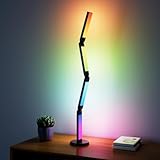
Overview: This smart RGB desk lamp transforms any workspace into a dynamic environment with 16 million colors and 99+ scene modes. Controlled via app or remote, it offers music synchronization that pulses with your audio, creating an immersive atmosphere for gaming or content creation. The foldable four-section design allows 360-degree adjustment for both functional lighting and decorative display.
What Makes It Stand Out: The sheer versatility sets this apart. Music sync capability uses a built-in microphone to match lighting to rhythm, while the “Magic Lantern” app provides granular control over color temperature, brightness, and timers. The foldable design isn’t just aesthetic—it delivers wider illumination angles than traditional round lamps, and the sturdy base maintains stability even in dramatic folded positions.
Value for Money: Priced competitively against other smart LED lamps, this offers premium features typically found in more expensive models. The combination of task lighting and ambient entertainment functionality eliminates the need for separate devices, making it a cost-effective solution for gamers and remote workers seeking atmospheric enhancement.
Strengths and Weaknesses: Pros include exceptional customization, stable base, easy installation, and dual control methods. The foldable design provides unmatched positioning flexibility. Cons involve potential app dependency, possible overwhelming options for users wanting simple lighting, and the microphone may pick up unwanted ambient noise in quiet environments.
Bottom Line: Ideal for gamers, streamers, and creative professionals who want their lighting to work as hard as they do. The feature-rich design justifies its price point, though minimalists may find it excessive.
7. Quntis Curved Monitor Light Bar 15 RGB Backlight for 34"+ Screens, Computer Bar Lights Fold Dual Light with Color Temperature Brightness Stepless Dimming, No Glare Desk Lamp for Home Office Gaming

Overview: The Quntis Curved Monitor Light Bar addresses the unique challenges of ultrawide curved monitors. Extending to 25.74 inches, it perfectly contours to 34"+ screens with 1000R-3000R curvature, eliminating dark edges and glare. The dual light bar design provides both task illumination and ambient RGB backlighting, creating a professional-grade lighting solution for serious users.
What Makes It Stand Out: This is the only light bar specifically engineered for curved monitors, with patented clamps accommodating screens from ultra-thin to 3.54" thick. The IEC/TR 62778 anti-blue light certification (RG0) and 45° asymmetrical optical design protect eyes during marathon sessions. A precision light sensor automatically adjusts brightness based on ambient conditions, while RA98 CRI ensures accurate color reproduction for design work.
Value for Money: Positioned at a premium price point, it delivers specialized functionality that generic light bars cannot match. For professionals using expensive ultrawide monitors, this protects that investment by reducing eye strain and improving productivity, justifying the cost over cheaper alternatives.
Strengths and Weaknesses: Strengths include perfect curved monitor integration, dual-light versatility, auto-adjustment, and exceptional color accuracy. The foldable design adapts to various tasks. Weaknesses are the high price limiting it to serious users, and it’s overkill for standard flat monitors or smaller screens.
Bottom Line: An essential accessory for professionals and enthusiasts with 34"+ curved monitors. The specialized design and eye-care features make it worth every penny for the target audience.
8. Govee RGBIC Gaming Lights, 10ft Neon Rope Lights Soft Lighting for Gaming Desks, LED Strip Lights Syncing with Razer Chroma, Support Cutting, Smart App Control, Music Sync, Adapter (Only 2.4G Wi-Fi)

Overview: Govee’s RGBIC Neon Rope Lights bring advanced lighting effects to gaming desks in a flexible 10-foot package. Featuring 42 individually controllable segments with 84 LED beads per meter, these lights deliver smooth, spotless illumination without the gaps of traditional strips. The neon silicone construction diffuses light evenly, creating a premium aesthetic that elevates any battlestation.
What Makes It Stand Out: The cuttable design with 12 specific cutting points allows customization to fit most desk configurations perfectly. Integration with Razer Chroma and Govee’s AI Gaming Sync Box (sold separately) enables game-reactive lighting for true immersion. The inverted illumination technology eliminates glare and hotspots, while the Shore Hardness 45-degree silicone ensures durability and smooth wrapping around desk edges.
Value for Money: Offering RGBIC technology at a mid-range price point, these deliver exceptional value. The density of LED beads and cuttable flexibility rival more expensive options. While the sync box is an additional purchase, the core product provides impressive standalone functionality.
Strengths and Weaknesses: Pros include high LED density, cuttable customization, glare-free diffusion, and robust software ecosystem. The neon effect looks premium. Cons are the inability to splice cut pieces, requiring careful measurement, and the 2.4GHz Wi-Fi limitation. Razer Chroma sync needs the separate sync box for full functionality.
Bottom Line: A top-tier choice for gamers wanting customizable, immersive desk lighting. The cuttable design and RGBIC segments offer flexibility that static strips cannot match, making it a smart investment for personalized setups.
9. Weilisi 10.2" Desk Ring Light with Stand, 360° Rotate Desk Lamps for Home Office with C-Clamp, Flexible Height Desk Light, Adjust Arm Ring Light for Desk, Podcast, Gaming, Recording, Zoom Lighting

Overview: The Weilisi 10.2" Desk Ring Light is a purpose-built solution for video conferencing, content creation, and detailed tasks. Featuring a full-screen design that eliminates shadows and restores natural lighting, this clamp-mounted ring light saves desk space while providing professional-grade illumination. The telescoping stand extends to 11.42 inches, offering versatile positioning for various applications.
What Makes It Stand Out: The 360° rotating base combined with 180° adjustable light head delivers unmatched positioning flexibility. The upgraded C-clamp accommodates surfaces up to 2.34 inches thick with a non-slip silicone base that prevents scratches. Unlike traditional ring lights, this model functions as a true desk lamp, webcam light, or laptop illuminator, adapting to multiple workflows without occupying valuable surface space.
Value for Money: This positions itself as an affordable alternative to professional studio lighting. For remote workers and creators, it solves multiple lighting challenges in one device, eliminating the need for separate desk lamps and video lights. The build quality exceeds expectations at this price point.
Strengths and Weaknesses: Strengths include exceptional adjustability, space-saving clamp design, uniform diffusion, and stable construction. It excels at eliminating harsh shadows for video calls. Weaknesses include the ring format’s distinctive catchlights in eyes, which some users dislike, and limited color temperature range compared to RGB competitors.
Bottom Line: An excellent tool for remote professionals, podcasters, and streamers prioritizing video quality. The flexible positioning and space-saving design make it a practical upgrade from basic desk lamps.
10. ODK Reversible Gaming Desk LED Lights, 40 Inch Computer Desk with Storage Shelves & Monitor Stand, Study Table for Home Office, Small Space Bedroom, Carbon Fiber Black

Overview: The ODK Reversible Gaming Desk integrates LED lighting directly into a 40-inch computer desk, creating an all-in-one workspace solution. Featuring 10 static colors, 6 brightness levels, and 10 dynamic modes, the built-in lighting reduces eye strain while enhancing focus. The reversible storage shelves and integrated monitor stand maximize functionality in compact spaces.
What Makes It Stand Out: This isn’t just a desk with LEDs—it’s a thoughtfully designed furniture piece. The reversible 2-tier shelf adapts to left or right-side placement, accommodating CPU towers or books. The carbon fiber texture surface resists scratches and water, while adjustable foot pads ensure stability on uneven floors. The memory function restores your preferred lighting settings automatically.
Value for Money: As a complete furniture and lighting package, this offers compelling value. Purchasing a comparable desk and separate LED strips would cost significantly more and lack the integrated aesthetic. For small spaces, the built-in storage eliminates additional furniture purchases.
Strengths and Weaknesses: Pros include sturdy metal/MDF construction, versatile storage, integrated cable management potential, and cohesive design. The LED controls are simple and reliable. Cons include the fixed 40-inch size limiting upgrade flexibility, and integrated LEDs cannot be repositioned or upgraded like separate strips. Assembly required.
Bottom Line: Perfect for gamers and students in small bedrooms or apartments. The integrated design saves space and money, though enthusiasts who frequently upgrade may prefer modular components. A practical, stylish solution for organized gaming setups.
Why Proper Gaming Table Lighting Matters
The Impact on Performance and Focus
Strategic lighting directly influences your gaming performance by creating optimal visual conditions for extended play sessions. When your tabletop is properly illuminated, you can quickly locate controllers, keyboards, and other peripherals without breaking concentration. This seamless interaction reduces cognitive load, allowing your brain to focus entirely on gameplay rather than fumbling in the dark. Research shows that well-lit workspaces improve reaction times and decision-making accuracy—critical advantages in competitive gaming where milliseconds determine victory.
Health Benefits: Reducing Eye Strain
Dark rooms with bright screens create extreme contrast that forces your eyes to constantly adjust, leading to digital eye strain, headaches, and fatigue. Proper ambient lighting bridges the brightness gap between your screen and surrounding environment, reducing the workload on your eye muscles. This is particularly crucial during marathon gaming sessions when you’re vulnerable to Computer Vision Syndrome. The right lighting setup can cut down on dry eyes, blurred vision, and that post-gaming headache that ruins your evening.
Creating the Right Atmosphere
Lighting shapes the emotional tone of your gaming experience. Warm, dim lighting can make horror games more terrifying, while dynamic RGB effects sync with fast-paced action titles to heighten excitement. The psychological impact of color temperature and intensity influences your immersion level, making games feel more engaging and memorable. Your lighting becomes an extension of the game’s world, blurring the line between reality and virtual adventure.
Types of Gaming Table Lights for Dark Spaces
LED Strip Lights
Flexible LED strips offer unparalleled versatility for dark game rooms. These adhesive-backed ribbons can contour around desk edges, behind monitors, or along shelving units to create continuous light zones. Their low profile keeps them unobtrusive while providing customizable accent lighting that eliminates harsh shadows. Most modern strips feature millions of color options and can be cut to exact lengths, making them ideal for custom desk configurations and irregular spaces.
RGB Light Bars
Vertical or horizontal light bars deliver concentrated illumination with sophisticated color-mixing capabilities. Positioned behind monitors or flanking your gaming setup, they cast a wide glow that reduces eye strain without creating direct glare. Many models feature built-in diffusion that softens the light output, creating that professional studio appearance. Their standalone design makes them perfect for renters or anyone wanting non-permanent installation options.
Desk Lamps and Task Lighting
Focused task lighting provides targeted illumination exactly where you need it most. Adjustable arms and pivoting heads let you direct light onto your keyboard, controller, or paperwork without spilling onto your screen. Modern gaming desk lamps incorporate dimming controls, color temperature adjustment, and even USB charging ports. Look for models with wide bases that won’t tip during intense gaming moments and matte finishes that prevent reflective glare.
Overhead Pendant Lights
Suspended lighting fixtures create dramatic overhead illumination that defines your gaming zone. Pendant lights with downward-focused beams can spotlight your table while keeping the rest of the room dark for ambiance. Dimmable options let you adjust intensity based on time of day or game genre. The key is positioning them far enough back to avoid casting shadows from your head onto the screen while maintaining adequate tabletop brightness.
Smart Bulbs and Integrated Systems
Wi-Fi-enabled bulbs transform standard fixtures into customizable gaming lights. These connect to your network for voice control, scheduling, and synchronization with other smart devices. Integration with gaming platforms allows lights to react to in-game events, changing colors when you take damage or score points. The ecosystem approach lets you expand your lighting setup gradually, adding floor lamps, accent lights, and ceiling fixtures that all work in harmony.
Key Features to Consider When Choosing Gaming Lights
Brightness and Lumens
The brightness of gaming lights is measured in lumens, and finding the right level prevents both eye strain and washed-out screens. For dark rooms, aim for 200-400 lumens for ambient backlighting and 450-800 lumens for task lighting. Too bright and you’ll lose the immersive darkness; too dim and you’ll strain to see peripherals. Dimmable options provide flexibility for different games and times of day, letting you fine-tune brightness without replacing hardware.
Color Temperature and Customization
Color temperature, measured in Kelvin, dramatically affects your gaming environment. Cool whites (5000K-6500K) enhance focus and mimic daylight for competitive gaming, while warm tones (2700K-3500K) create cozy atmospheres for story-driven adventures. RGB customization expands possibilities beyond white light, offering millions of colors to match game aesthetics or your mood. Look for lights with high Color Rendering Index (CRI) values above 80 to ensure colors appear vibrant and true.
Adjustability and Positioning
The ability to pivot, swivel, and reposition lights ensures you can adapt to different gaming setups and preferences. Flexible mounting options like clamps, adhesive backing, or weighted bases accommodate various desk styles and materials. Height-adjustable fixtures prevent light from shining directly into your eyes or reflecting off glossy screens. Consider how easily you can reconfigure lights when upgrading monitors, changing desk layouts, or switching between PC and console gaming.
Connectivity and Smart Features
Modern gaming lights offer connectivity through Wi-Fi, Bluetooth, or proprietary hubs. App control lets you adjust settings without leaving your game, while voice commands work hands-free during intense moments. Sync capabilities with games, music, or screen content create dynamic lighting effects that respond to on-screen action. Check compatibility with your existing smart home ecosystem and gaming platforms to ensure seamless integration.
Power Source and Installation
USB-powered lights plug directly into your computer or hub, drawing minimal power and eliminating extra outlets. AC-powered options provide brighter output for larger spaces but require accessible wall sockets. Battery-powered lights offer ultimate placement flexibility but need regular recharging. Consider installation complexity—adhesive strips work for most surfaces but may damage delicate finishes, while clamp mounts need sufficient desk edge thickness.
Lighting Placement Strategies for Dark Game Rooms
Direct vs. Indirect Lighting
Direct lighting shines straight onto your gaming area, providing clear visibility but risking harsh shadows and glare. Indirect lighting bounces off walls or ceilings, creating soft, diffused illumination that maintains darkness while reducing contrast. The optimal strategy combines both: use indirect lighting as your primary ambient source and supplement with direct task lighting for specific needs. This layered approach eliminates the cave-like feeling of pure screen light while preserving atmospheric darkness.
Backlighting Your Monitor
Placing lights behind your monitor creates a halo effect that dramatically reduces eye strain. This technique, called bias lighting, extends your screen’s perceived brightness without adding glare. Position strips or bars 2-4 inches from the monitor’s back edge, ensuring even light distribution around all sides. The backlight color should match your screen’s average color temperature—neutral white for most gaming, or dynamic colors if syncing with content.
Under-Table and Floor Lighting
Illuminating the floor area beneath and around your desk creates depth and prevents the floating screen effect. LED strips mounted under table edges cast a subtle glow that defines your gaming zone without reaching your eyes. Floor-level lighting also helps you navigate the room safely during breaks without turning on overhead lights. Keep these lights dimmer than your primary sources—around 100-150 lumens—to maintain the dark room aesthetic.
Corner and Accent Lighting
Dark corners make rooms feel smaller and can create unsettling peripheral shadows during horror games. Strategic accent lights in room corners expand the perceived space and eliminate lurking shadows. Use upward-facing floor lamps or wall-mounted sconces to wash corners with soft light. This technique also creates visual balance, preventing your gaming setup from feeling like an isolated bright island in a sea of darkness.
Avoiding Screen Glare
Glare occurs when light sources reflect directly off your screen, creating distracting bright spots. Position lights at 45-degree angles from your monitor and never place them behind you where they’ll reflect in the screen. Matte screen protectors help diffuse reflections, while monitor hoods block overhead light. Test placement by sitting in your gaming position and checking for reflections from all angles before finalizing installation.
Color Psychology and Gaming Ambiance
How Colors Affect Gaming Performance
Different colors trigger distinct psychological and physiological responses that can enhance or hinder performance. Blue light boosts alertness and reaction times, making it ideal for competitive shooters and strategy games. Red tones increase heart rate and intensity, perfect for action-packed sessions. Green promotes calm focus, beneficial for puzzle games and long RPG campaigns. Understanding these effects lets you choose colors that complement your gaming goals rather than working against them.
Matching Light to Game Genres
Customize your lighting palette to match game genres for deeper immersion. Horror games benefit from deep purples and flickering oranges that mimic torchlight. Racing games come alive with dynamic reds and blues that pulse with engine sounds. Fantasy RPGs shine with ethereal blues and magical greens. Many smart lighting systems offer pre-configured scenes for different genres, automatically adjusting when you launch specific games.
Dynamic vs. Static Lighting
Static lighting provides consistent, predictable illumination that won’t distract during competitive play. Dynamic lighting changes colors, brightness, or patterns based on time, game events, or music. While dynamic effects enhance immersion in story-driven games, they can be distracting in competitive scenarios where visual consistency matters. Consider having both options available and switching between them based on what you’re playing.
Syncing Lights with Gameplay
Advanced lighting systems can connect directly to games, changing colors when your health drops, flashing when you score, or pulsing with in-game music. This synchronization creates a multi-sensory experience that extends the game beyond your screen. Setup typically requires specific software or platform integration, so verify compatibility with your most-played titles. The feature works best with story-rich games where atmospheric enhancement adds value.
Installation and Setup Tips
Planning Your Layout
Sketch your room and gaming setup before purchasing any lights. Mark power outlet locations, desk dimensions, and monitor positions. Identify primary viewing angles and potential glare sources. This planning prevents buying incompatible products and ensures you have enough cable length and power capacity. Consider future upgrades—leave expansion room for additional monitors, speakers, or accessories that might affect lighting placement.
Cable Management Solutions
Gaming setups quickly become cable jungles, and lighting adds more wires to manage. Use adhesive cable clips to route light strips along desk edges cleanly. Cable sleeves bundle multiple wires together, while under-desk trays hide power bricks and excess length. Wireless options reduce clutter but may have latency issues for sync features. Plan cable routes that don’t interfere with mouse movement or chair adjustments.
Safety Considerations
Never overload power strips with multiple high-wattage lights. Check each light’s power draw and ensure your circuits can handle the total load. Keep light strips away from heat sources like gaming PCs or consoles that could degrade adhesive. Ensure all electrical connections are secure and away from spilled drinks. For rental spaces, use non-damaging mounting options to avoid losing security deposits.
Calibration and Fine-Tuning
Spend time adjusting brightness, color balance, and positioning after installation. Take photos from your gaming position to check for glare and uneven lighting. Adjust colors at night when the room is darkest to see true effects. Most smart lights offer calibration wizards in their apps that guide you through optimal settings. Revisit calibration monthly as your eyes adapt and seasons change natural light levels.
Maintenance and Longevity
Cleaning Your Gaming Lights
Dust and grime accumulate on light strips and fixtures, dimming output and affecting color accuracy. Use microfiber cloths lightly dampened with water to wipe down surfaces monthly. Avoid harsh chemicals that can damage diffusion panels or adhesive backing. For hard-to-reach strips, compressed air blasts away dust without dislodging components. Clean lights while powered off and completely dry before reconnecting.
Software Updates for Smart Systems
Manufacturers regularly release firmware updates that improve performance, add features, and fix bugs. Enable automatic updates in your lighting app to stay current. Updates can affect compatibility with games and platforms, so check community forums after major releases. Keep backup settings saved before updating in case you need to revert to previous configurations.
When to Replace Components
LED lights gradually dim over time, typically lasting 25,000-50,000 hours. Replace strips when colors appear washed out or sections stop working. Power adapters may fail sooner due to heat stress—replace if lights flicker or won’t turn on. Upgrade when new features like better sync capabilities or improved color accuracy become available, but don’t chase every new release unless current hardware limits your experience.
Frequently Asked Questions
How bright should gaming table lights be in a dark room?
Aim for 200-400 lumens for ambient backlighting behind your monitor and 450-800 lumens for task lighting on your tabletop. The key is adjustability—dimmable lights let you fine-tune brightness based on the game and time of day. Too bright eliminates the immersive darkness, while too dim causes eye strain. Start at 50% brightness and adjust until you can comfortably see peripherals without the light creating screen glare.
Do RGB lights cause input lag or affect gaming performance?
RGB lights themselves don’t cause input lag since they operate independently of your gaming hardware. However, lighting software running in the background can consume CPU and RAM resources, potentially impacting performance on lower-end systems. Hardware-based sync solutions that connect directly to your monitor or console have minimal system impact. If you notice performance issues, close lighting apps during competitive play or use static lighting that doesn’t require constant software processing.
What’s the best color temperature for reducing eye strain during long sessions?
A neutral white around 5000K-6500K most closely matches daylight and reduces eye strain by minimizing the contrast between your screen and surroundings. However, many gamers prefer slightly warmer 4000K-5000K for evening sessions as it’s less disruptive to sleep cycles. Avoid pure blue light (above 6500K) for extended periods. The best approach is using adjustable lights that let you shift cooler during competitive day gaming and warmer for relaxed evening adventures.
Can I sync lights with any game, or only specific titles?
Sync capabilities depend on the lighting system and game integration. Major platforms like Razer Chroma, SteelSeries Engine, and Corsair iCUE support hundreds of popular games with native integration. For unsupported titles, screen-matching modes sample your display’s edge colors and replicate them on surrounding lights, working with any content. Console gamers can use HDMI pass-through devices that analyze video signals for universal compatibility. Check your lighting system’s compatibility list before purchasing if sync is a priority feature.
How do I prevent LED strips from falling off my desk?
Clean surfaces thoroughly with isopropyl alcohol before applying adhesive strips—dust and oils prevent proper bonding. Apply firm pressure for 30 seconds and let adhesive cure for 24 hours before adjusting. For heavy strips or textured surfaces, supplement with adhesive cable clips every 12 inches for extra support. In hot environments, heat-resistant 3M automotive adhesive provides stronger hold than standard strips. Consider magnetic mounting systems for easy repositioning without residue.
Are battery-powered gaming lights worth it for dark rooms?
Battery-powered lights offer placement flexibility but have limitations for primary gaming lighting. Most last 6-20 hours on a charge, requiring regular recharging that interrupts gaming routines. They’re ideal for accent lighting in hard-to-wire areas or temporary setups. For main gaming table illumination, AC or USB power is more reliable. If you choose battery options, select models with pass-through charging so you can use them plugged in during long sessions.
What’s the difference between bias lighting and regular backlighting?
Bias lighting specifically refers to placing neutral white light behind your monitor to reduce eye strain and improve perceived contrast. It’s calibrated to a specific brightness (about 10% of your screen’s maximum) and color temperature (6500K) to match professional video standards. Regular backlighting uses any color or brightness for aesthetic effect. While all bias lighting is backlighting, not all backlighting qualifies as proper bias lighting. For competitive gaming, true bias lighting provides the most eye comfort benefits.
How many light sources should a dark game room have?
Aim for 3-5 distinct light sources to create layered illumination. Start with bias lighting behind your monitor as the primary source. Add task lighting for your tabletop, under-desk lighting for depth, and one or two accent lights for room balance. Multiple dim sources create better ambiance than one bright light, allowing you to adjust each zone independently. This layering prevents the “spotlight effect” where only your gaming area is visible, which can feel claustrophobic during long sessions.
Can gaming lights help with streaming and content creation?
Absolutely. Proper lighting eliminates the amateur look of grainy, underexposed webcam footage in dark rooms. Soft, diffused lighting from the front (key light) and side (fill light) makes your face visible without washing out your screen’s colors. RGB accent lights create dynamic backgrounds that react to gameplay, making streams more engaging. Many successful streamers use color-changing lights that sync with alerts, donations, or chat commands to create interactive viewer experiences.
What’s the most cost-effective way to start with gaming table lighting?
Begin with a quality LED strip kit for monitor backlighting—this single addition provides the biggest eye strain reduction for the lowest cost. USB-powered strips under $30 offer excellent value. Next, add a dimmable desk lamp for task lighting. Expand gradually with smart bulbs in existing fixtures before investing in premium sync systems. Avoid cheap no-name brands with poor color accuracy; mid-range options from established manufacturers provide better long-term value through durability and software support.
See Also
- 10 Best Value Gaming Table Lights for Home Game Nights in 2026
- 10 Best Gaming Table Lights for Low-Light Environments This Year
- Stop Shadows on Miniatures with the 10 Best Clip-On Game Lights This Year
- Stop Eye Strain with the 10 Best Flexible Arm Game Lights This Year
- 10 Best Clip-On Game Lights for Small Table Setups in 2026